I started to write a game report of this new game from Andrea owner of Ganesha Games, but I have to stop. This new release form Andrea is what I have been waiting for for over 25 years. About 25 years ago I was a big D&D fan, I leaved and breathed D&D. I did not get to be a player much, as I was a very good DM. I would spend days building my own adventures, and the maps to go with them. I even took drafting in school to help with my maps. I have moved away from RPG, as I got tired being the DM, and ended up in the Miniatures gaming. I love small, games with a few minis, and large games will tons of minis.
Now Andrea comes up with a solo RPG, that is fun, it also builds the maps for you. If I had this book 25 years ago it would have saved a ton of time I spent building all of the maps I drew. Fast forward to today, I can see this book in every DM's book bag. This it not only a game, but a very good tool. You can use it as is or use it to build the map and use charts, and tables from any RPG system to fill in the fluff.
Now back to the game play. I have completed the adventure I started to review. It went on for a long time, as I had some great die rolls. I also completed a second adventure, that was over much quicker as I ended up with a final boss on the 12 turn.
I have a new war band, and this one is completely random as I did not pick them but rolled them.
This one will have a Warrior, Cleric, Wizard, and a Halfling. I will post this one for sure.
Noel
Tuesday, April 12, 2016

Saturday, April 9, 2016
My First 4AD game.
I am going to start by saying I suck at writting!
So yesterdy I got the game printed it out in my normal booklet format. I sat down and read through most of it. Once I thought I had a handle on this game I sat down to make my first roster. I picked as my first player Belock the Warrior (Light Armor, Sword, Shield),and bandage. Next I have Grum The Dwarf (Heavy Armor, 2 hand axe) lantern, rope, bandage. Next I have Swann the Cleric (Light Armor, shield, mace) lantern. And lastly a Wizard Misto (small staff) bandage x2, lantern. In hind sight I only needed one lantern.

Now on to the map. I rolled for the entrance and ended up with a 4. As the party entered this entrance they were all excited to start their new careers and get on with it. So they needed to pick the right passage, or the left. As I am right handed that is the one they went for. On a roll of D66 I got 33. This is a corridor with a door on the far north end and on on the west wall. As this did not fit I rotated the room to make it work. The door in now at the south connecting this to the entrance room. And the door is now on the east wall.
As the party enters the door to the passage they see the room is empty. OK now the party is pissed. Their first day on the job, and their first door come up empty. The Cleric decides to search the place, an is rewarded with a clue. So now with only one way to go ( door on the east wall) the move up to it and Belock just opens the door. And to his surprise standing in room 52 from the book is a Boss Mummy. OK Belock says lets get it on. First o fight is Belock and he scores a great hit for one wound on the Mummy boss. Next up is Grum with his mighty axe went for the legs of the Mummy and was supprized with a great hit, taking the Mummy Boss down to 3 life points. Swann not wanting to be left out went for a bash attach, and also dropped the Mummy down another LP. Misto waved his hands in a great show, and his fire ball grew with every wave of his hands, he then dropped it, finishing his attack with a big old OOPS my bad.
The Mummy took it out on Misto the clumsy with two attacks, but only one landed.
Quickly the party took care of the Mummy boss, who passed his M roll to stay and fight. In the end the party got a potion of healing,and Belock went up a level.
Time for a break. Will pick up the game tomorrow.
So yesterdy I got the game printed it out in my normal booklet format. I sat down and read through most of it. Once I thought I had a handle on this game I sat down to make my first roster. I picked as my first player Belock the Warrior (Light Armor, Sword, Shield),and bandage. Next I have Grum The Dwarf (Heavy Armor, 2 hand axe) lantern, rope, bandage. Next I have Swann the Cleric (Light Armor, shield, mace) lantern. And lastly a Wizard Misto (small staff) bandage x2, lantern. In hind sight I only needed one lantern.

Now on to the map. I rolled for the entrance and ended up with a 4. As the party entered this entrance they were all excited to start their new careers and get on with it. So they needed to pick the right passage, or the left. As I am right handed that is the one they went for. On a roll of D66 I got 33. This is a corridor with a door on the far north end and on on the west wall. As this did not fit I rotated the room to make it work. The door in now at the south connecting this to the entrance room. And the door is now on the east wall.
As the party enters the door to the passage they see the room is empty. OK now the party is pissed. Their first day on the job, and their first door come up empty. The Cleric decides to search the place, an is rewarded with a clue. So now with only one way to go ( door on the east wall) the move up to it and Belock just opens the door. And to his surprise standing in room 52 from the book is a Boss Mummy. OK Belock says lets get it on. First o fight is Belock and he scores a great hit for one wound on the Mummy boss. Next up is Grum with his mighty axe went for the legs of the Mummy and was supprized with a great hit, taking the Mummy Boss down to 3 life points. Swann not wanting to be left out went for a bash attach, and also dropped the Mummy down another LP. Misto waved his hands in a great show, and his fire ball grew with every wave of his hands, he then dropped it, finishing his attack with a big old OOPS my bad.
The Mummy took it out on Misto the clumsy with two attacks, but only one landed.
Quickly the party took care of the Mummy boss, who passed his M roll to stay and fight. In the end the party got a potion of healing,and Belock went up a level.
Time for a break. Will pick up the game tomorrow.
Saturday, February 20, 2016
ASOBH Game Cards
Hello.....
I have created a set of cards for my Ratman army and wanted to share how I did this. First I start with having good photo of each minis I wanted to place on each card. I took photos of each of the Rat boys, using my coffee can photo box. Then I removed the background of the photo using Power Point. This is not required, but I felt it would give me a better looking card. To edit the photo I used Power Point in Office 2016, this can also be done in office 2010, and 2013 but it is done in word.
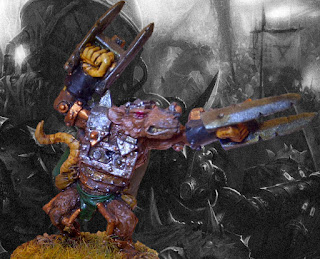
In this photo I have started to remove the back ground, then save the image as .png.

Now with the raw image (mini with no background) I added a new back ground also using Power Point. I had the new back ground open in a slide, then placed the mini over the back ground, grouped the two images and saved it.
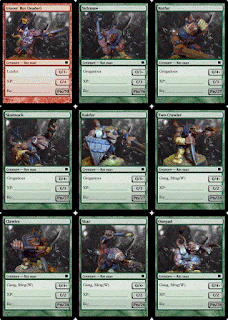
Here is a photo I did in Word 2010, this is just an example.

Now that I have my photos I just needed to start up Magic Set Editor and make the cards.
For this I use the Leveler template. I just used the default fields as I wanted, and this can take a bit of messing around. Once I have a card I like I copy it and edit it with the new photo and information.

With the card set complete I just saved it then printed it off to PDF, and to paper. I an not sure if I will user my laminate the cards, or just print on card stock.
And the end result is this PDF file of my cards.
Well I hope this helps you make your own cards.
I have created a set of cards for my Ratman army and wanted to share how I did this. First I start with having good photo of each minis I wanted to place on each card. I took photos of each of the Rat boys, using my coffee can photo box. Then I removed the background of the photo using Power Point. This is not required, but I felt it would give me a better looking card. To edit the photo I used Power Point in Office 2016, this can also be done in office 2010, and 2013 but it is done in word.
In this photo I have started to remove the back ground, then save the image as .png.

Now with the raw image (mini with no background) I added a new back ground also using Power Point. I had the new back ground open in a slide, then placed the mini over the back ground, grouped the two images and saved it.

Here is a photo I did in Word 2010, this is just an example.

Now that I have my photos I just needed to start up Magic Set Editor and make the cards.
For this I use the Leveler template. I just used the default fields as I wanted, and this can take a bit of messing around. Once I have a card I like I copy it and edit it with the new photo and information.

With the card set complete I just saved it then printed it off to PDF, and to paper. I an not sure if I will user my laminate the cards, or just print on card stock.
And the end result is this PDF file of my cards.
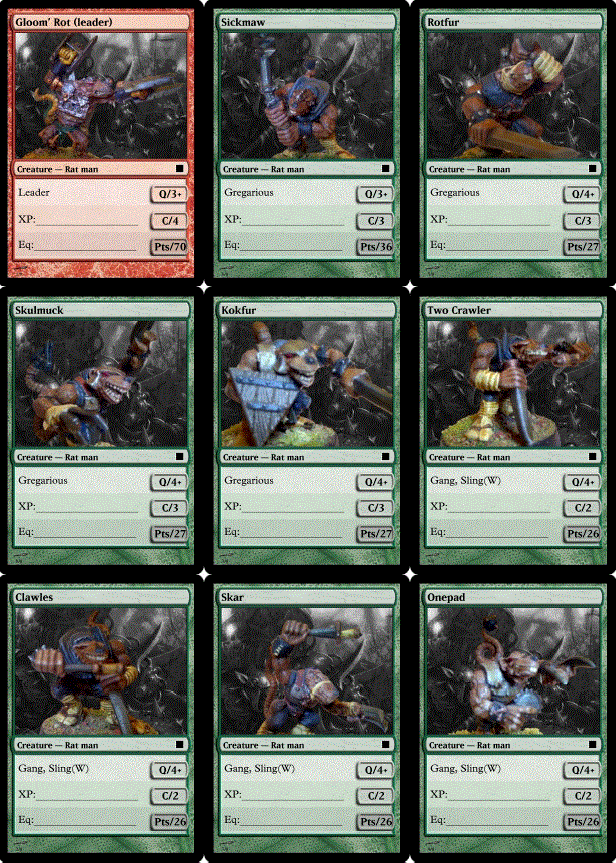
Well I hope this helps you make your own cards.
Saturday, August 22, 2015
Windows 10 Update!! My how to.....
So if you have found this page searching for the below error codes I hope this will help you. But as all ways I can take no responsibility for any issues you may encounter. Backup Backup, Backup before you do any thing......
With the release of Windows 10 (Win10), and being a free update if you own Windos 7 or Windows 8, 8.1 this should be simple right...... Well in my case it was not. I have 4 computers running Windows 7, and 1 running Windows 8.1, and all of these systems have the same issues, "Windows 10 is still validating on your system". So My fisrt reaction was to force the update by going to the MS web site and doing it via the update tool. This ended in me having to rebuild my whole system. I failed during the build, and did not revert back to the current state. I later found this could be because I had a second hard drive that was once a primary drive. I upgraded to a SSD, and kept the old HDD as my storage drive, But to not go back to the current state, not good.
I waited a few weeks for the other machines, and even the brand new build, and still no update. So I had to figure this out. First I went to Windows update on my computer and looked up the update history. Here I found an error Windows 10 failed to install error Code 80240020. What the heck does this mean?? I looked it up on Google, and found I was not alone with this issue. So what I found was that the update downloaded but was bad. So I did what I do at work when the updated come down bad (download is corrupt), go to C:\Windows\SoftwareDistribution\Download then running a command CMD Type in "wuauclt.exe /updatenow" This will start the download and update, BUT I quickly got this error after the build started to run "Windows 10 install error C1900101-30018" What the heck is this???? Back to Google and once more found I was not the only one with this error. In this case it could have been my Antivirus, or another start up service running that caused this issue. So I uninstalled my Anti virus, and did a clean boot of windows. Clan boot is simply stopping any non system start up program from starting, You can follow this link to do a clean boot https://support.microsoft.com/en-us/kb/929135. Once I removed the AV, and did a clean boot I went back to the above C:\Windows\SoftwareDistribution\Download then running a command CMD Type in "wuauclt.exe /updatenow, but this did not work... So off to Google one more time. I found the link to the Windows 10 media builder tool. https://www.microsoft.com/en-us/software-download/windows10. Follow the link and download the media builder tool for your CPU type. As I have 64bit PCs I used that one. One of the options is to upgrade when you run the media builder, so I ran the update. I sat back and after an hour my first system was running Win 10. I checked it for errors, and found non. I let the system run over night, and then added my content in the morning. It worked!!!!.
The next weekend I did the very same for my Windows 8.1 machine and this worked as well...
As the Win 8.1 machine was older (build and hard ware) it took a bit longer, and when it was done I was every happy.
So to sum this all up, this free upgrade was not so easy to do.......
What I did not mention in the above post is I did a full system image before I started the second time. I had to rebuild my computer when I did the first manual upgrade, and did not want to do that again. I used Acronis, as I use it for my job, but there are others and free ones. Here is a link to 5 good ones http://lifehacker.com/5303067/five-best-free-system-restore-tools . I have given the first one a try and it worked for me when I went from Win 7 to Win 8. The last one CloneZilla I have used for years and love it. CloneZilla is a DOS like app that runs under LINUX, and is not what I would recommend for new users. I happen to love this app and it has saved my butt more that a few times.
With the release of Windows 10 (Win10), and being a free update if you own Windos 7 or Windows 8, 8.1 this should be simple right...... Well in my case it was not. I have 4 computers running Windows 7, and 1 running Windows 8.1, and all of these systems have the same issues, "Windows 10 is still validating on your system". So My fisrt reaction was to force the update by going to the MS web site and doing it via the update tool. This ended in me having to rebuild my whole system. I failed during the build, and did not revert back to the current state. I later found this could be because I had a second hard drive that was once a primary drive. I upgraded to a SSD, and kept the old HDD as my storage drive, But to not go back to the current state, not good.
I waited a few weeks for the other machines, and even the brand new build, and still no update. So I had to figure this out. First I went to Windows update on my computer and looked up the update history. Here I found an error Windows 10 failed to install error Code 80240020. What the heck does this mean?? I looked it up on Google, and found I was not alone with this issue. So what I found was that the update downloaded but was bad. So I did what I do at work when the updated come down bad (download is corrupt), go to C:\Windows\SoftwareDistribution\Download then running a command CMD Type in "wuauclt.exe /updatenow" This will start the download and update, BUT I quickly got this error after the build started to run "Windows 10 install error C1900101-30018" What the heck is this???? Back to Google and once more found I was not the only one with this error. In this case it could have been my Antivirus, or another start up service running that caused this issue. So I uninstalled my Anti virus, and did a clean boot of windows. Clan boot is simply stopping any non system start up program from starting, You can follow this link to do a clean boot https://support.microsoft.com/en-us/kb/929135. Once I removed the AV, and did a clean boot I went back to the above C:\Windows\SoftwareDistribution\Download then running a command CMD Type in "wuauclt.exe /updatenow, but this did not work... So off to Google one more time. I found the link to the Windows 10 media builder tool. https://www.microsoft.com/en-us/software-download/windows10. Follow the link and download the media builder tool for your CPU type. As I have 64bit PCs I used that one. One of the options is to upgrade when you run the media builder, so I ran the update. I sat back and after an hour my first system was running Win 10. I checked it for errors, and found non. I let the system run over night, and then added my content in the morning. It worked!!!!.
The next weekend I did the very same for my Windows 8.1 machine and this worked as well...
As the Win 8.1 machine was older (build and hard ware) it took a bit longer, and when it was done I was every happy.
So to sum this all up, this free upgrade was not so easy to do.......
What I did not mention in the above post is I did a full system image before I started the second time. I had to rebuild my computer when I did the first manual upgrade, and did not want to do that again. I used Acronis, as I use it for my job, but there are others and free ones. Here is a link to 5 good ones http://lifehacker.com/5303067/five-best-free-system-restore-tools . I have given the first one a try and it worked for me when I went from Win 7 to Win 8. The last one CloneZilla I have used for years and love it. CloneZilla is a DOS like app that runs under LINUX, and is not what I would recommend for new users. I happen to love this app and it has saved my butt more that a few times.
Subscribe to:
Posts (Atom)